
Documentation
RustMinerSystem Settings Center
Configure RustMinerSystem accounts, safe route, two-step verification, HTTPS, mining certificates, blacklists, whitelists, quick presets, notifications, and import/export.
Settings Center
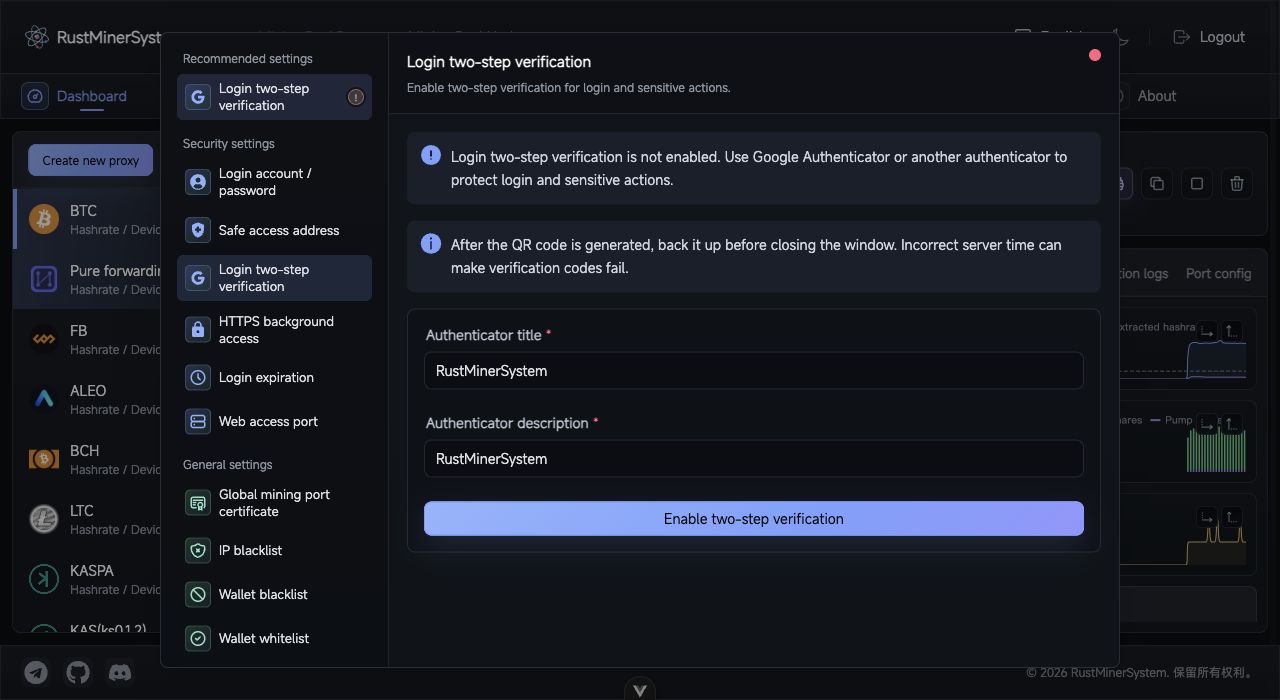
Settings Center: use the left grouped menu for security, general, and other settings, then edit the active setting on the right.
Open Settings from the Mining Proxy top menu. The settings center manages security, certificates, access rules, presets, notifications, import/export, and local instance information.
Security Settings
| Setting | Purpose |
|---|---|
| Login account / password | Change backend username and password. |
| Safe access route | Hide the default backend path. The service restarts after saving. |
| Login two-step verification | Enable TOTP and protect sensitive actions. |
| HTTPS backend access | Switch backend HTTP/HTTPS access. |
| Login expiration time | Control token lifetime; saving logs out current sessions. |
| Web access port | Change the backend web port. |
Production systems should change the default account, set a safe route, and enable two-step verification.
Certificates and Encryption
| Setting | Purpose |
|---|---|
| Global mining port certificate | Upload crt/pem and key for TLS/SSL mining ports. |
| KENC custom key | Set the key used by KENC encrypted ports. |
KENC clients must use the same key as the server.
Access Rules
IP blacklistblocks selected IP addresses from backend and proxy services.Wallet blacklistblocks selected wallets or subaccounts.Wallet whitelistallows only listed wallets or subaccounts.
Be careful not to blacklist your current management IP. Whitelists are stricter and should be prepared before enabling.
Notifications and Presets
Offline notifications can use ServerChan or SMTP and trigger on miner offline events or port hashrate drops.
Quick pools and quick wallets save commonly used endpoints and wallet addresses for the port form and hot update dialogs.
Import and Export
The import/export page can export current proxy ports as JSON and import RustMinerSystem JSON, Excel templates, or KTMinerProxy JSON. Export before upgrades, migrations, or large fee changes.
Other
Local UUID helps with authorization and troubleshooting. Restart service shows restart guidance for the current environment.