
Documentation
RustMinerSystem Proxy Port Creation and Editing
Create, edit, and clone RustMinerSystem third-party pool proxy ports with protocol, pool, fee wallet, and advanced compatibility settings.
Proxy Port Creation and Editing
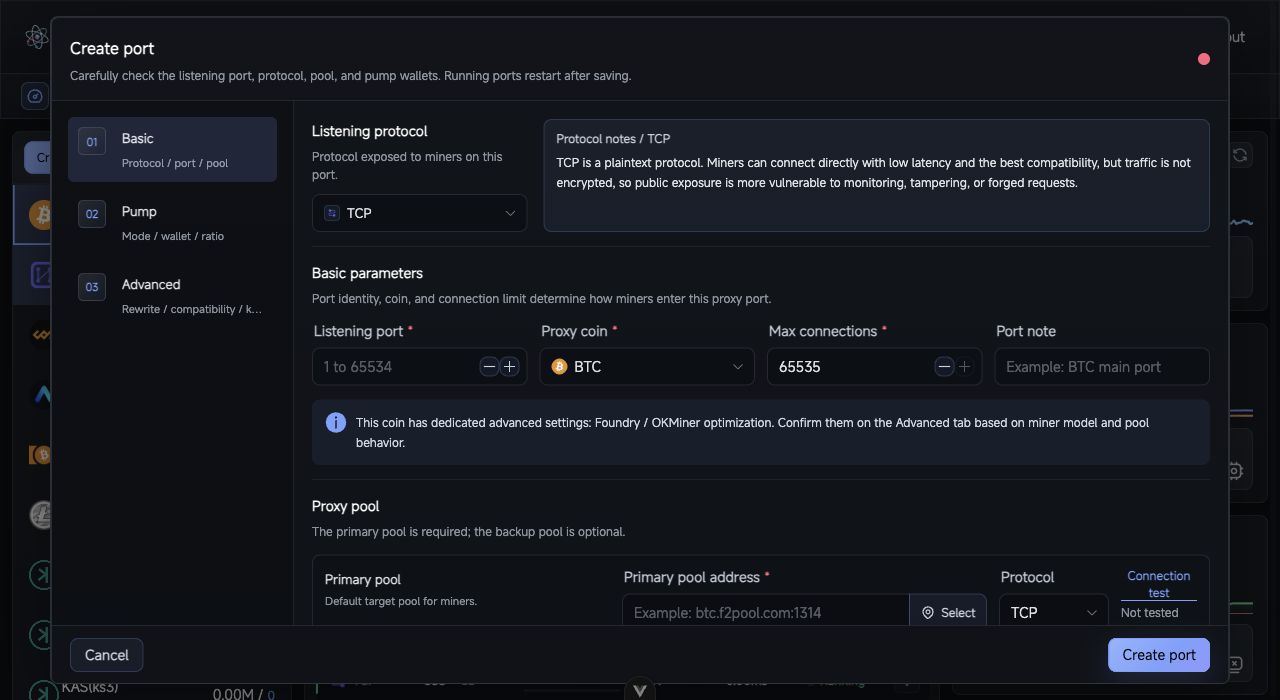
Proxy port form: configure the listener protocol, upstream pool, fee wallets, and advanced options across the Basic, Fee, and Advanced steps.
Proxy ports are the core RustMinerSystem workflow. Miners connect to a RustMinerSystem listening port, then the server forwards traffic to the configured upstream pool, records statistics, and applies fee wallets and compatibility rules.
Create a Port
- Open
Mining Proxy. - Click
Create New Proxyin the coin list. - Complete the
Basic,Fee, andAdvancedsections. - Click
Create Port.
Basic Settings
| Field | Description |
|---|---|
| Listening protocol | Protocol miners use to connect to RustMinerSystem. |
| Listening port | Must be 1 to 65534; avoid conflicts with web or mining ports. |
| Coin | Controls parsing, statistics, icon, and some compatibility settings. |
| Max connections | 0 means unlimited; production deployments should set a realistic limit. |
| Remark | Human-readable name such as BTC main port. |
| Primary pool | Default upstream pool. |
| Backup pool | Optional fallback pool. |
| Pool protocol | Must match the upstream address: TCP for TCP endpoints, TLS/SSL for SSL endpoints. |
Use the connection test buttons before saving when possible.
Listening Protocols
| Protocol | Use case |
|---|---|
| TCP | Best compatibility, commonly used on trusted networks. |
| TLS/SSL | Encrypted miner connection using the global mining certificate. |
| TTS | One port accepts both TCP and TLS miners. |
| TP | Transparent forwarding only; no parsing, statistics, fee, or replacement features. |
| RMS2 | RMS local client compressed TLS protocol. |
| RMS3 | Group compression protocol with high compression and higher CPU usage. |
| RMS3(Zstd) | Zstd-based RMS3 variant, usually lighter on CPU. |
| KENC | Compatible with KT local tools or KENC clients; key must match settings. |
Fee Wallets
Each fee wallet can contain wallet or subaccount, worker name, fee percentage, fee pool, and fee pool protocol. Keep the number of fee wallets small. If multiple parties need revenue sharing, pool-side split rules are usually easier to operate.
Advanced Settings
Advanced settings affect submitted data, compatibility, or share responses. Leave them at defaults unless the scenario is clear.
| Setting | Guidance |
|---|---|
| RMS3 compression level | Higher values usually save more traffic but increase CPU load. |
| RMS3 super compression | Must match the RMS local client setting. |
| Foundry / OKMiner optimization | Use for BTC, BCH, or LTC miners with those connection issues. |
| Lucky Miner optimization | Use for specific LTC firmware issues. |
| Hashrate protection | Protects customer hashrate but may under-collect fees. |
| Force successful share response | Treat with care; it changes what miners see after failed submissions. |
| Wallet / worker replacement | Rewrites specific wallets or worker names. |
| Kernel info replacement | Rewrites submitted miner kernel information. |
Edit or Clone
Edit Portloads the full configuration. Running ports restart after saving.Clone Portuses the current port as a template.Hot Update Fee Configchanges only fee wallets, pools, worker names, and ratios without disconnecting miners.
After creating or editing a port, test with a few miners first, compare RustMinerSystem data with upstream pool data, then scale gradually.