
Documentation
Custom management documentation overview
Learn how Custom Management centralizes installed RustMinerSystem custom builds, statistics, fee configuration, audits, and account permissions.
Custom Management Documentation
Custom Management is the operations console for every installed RustMinerSystem custom build under your account. It is not a single customer client or an installer. It is the central console used by operators to manage CIDs, client installs, active devices, coin permissions, wallet fee configuration, pool-node inside fees, audits, and account visibility.
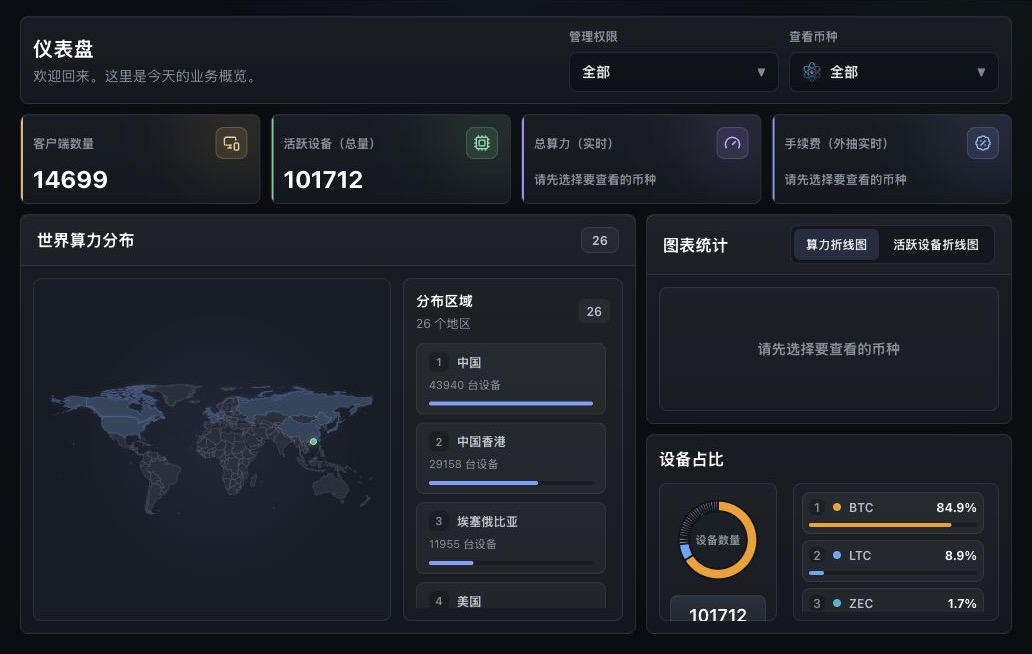
Dashboard: an administrator view shows aggregate client count, active devices, regional distribution, and coin share across the authorized custom-build scope.
Core Purpose
| Module | Purpose |
|---|---|
| Dashboard | View client count, active devices, world distribution, coin share, and coin-level charts for all visible custom builds. |
| Service Management | Manage coin permissions, wallet fee configuration, historical version activation, and client details by CID. |
| Pool Nodes | View live pool-node hashrate, online/offline devices, inside fees, and official fees. |
| Audit List | Review wallet add, edit, and delete requests before they affect production configuration. |
| Permission Assignment | Maintain account hierarchy and decide which custom builds each management account can see and operate. |
Managed Objects
The console uses CID as the primary management unit. A CID usually represents a delivered custom build or a customer-side management scope. Operators can inspect install scale, active devices, coin permissions, wallet settings, and pool-node fee settings by CID.
| Object | Description |
|---|---|
| Management account | The account used to sign in. Each account sees the scope assigned through permission management. |
| Custom service | A row in Service Management, usually with CID, custom name, active devices, client count, and coin permissions. |
| Client | An installed RustMinerSystem custom-build instance that reports data to the console. |
| Coin permission | The list of coins enabled for a custom service. |
| Wallet configuration | Per-coin fee wallet settings: anonymous wallet, subaccount, ratio, device name, and pool strategy. |
| Pool-node configuration | PoolNode-specific fee settings, independent from traditional proxy wallet settings. |
Permission View
Accounts with advanced permissions can access Audit List and Permission Assignment, and can maintain the visibility scope between management accounts. Standard management accounts only see assigned custom services.
Permission assignment affects:
- Which CIDs appear in the dashboard and service list.
- Which services an account can submit configuration requests for.
Configuration Lifecycle
Custom Management separates observation from write operations:
- Dashboard, service list, client list, and pool-node list are used for daily observation.
- Coin permissions, wallet configuration, and pool-node fee changes are production configuration changes.
- Wallet add, edit, and delete requests enter the audit flow before taking effect.
- New configuration usually applies to the latest and future versions; historical versions must be activated separately.
Recommended Use
- Start from the dashboard to check total clients, active devices, and primary coin share.
- Before changing wallet or fee settings, confirm the target CID and coin.
- When the client scale is large, use account and coin filters before opening charts or client details.
- Treat audits, deletes, fee changes, and permission assignment as production writes and confirm the business impact before submitting.