
Documentation
Custom Service Management
Manage coin permissions, wallet fee configuration, historical version activation, and client details for RustMinerSystem custom builds.
Custom Service Management
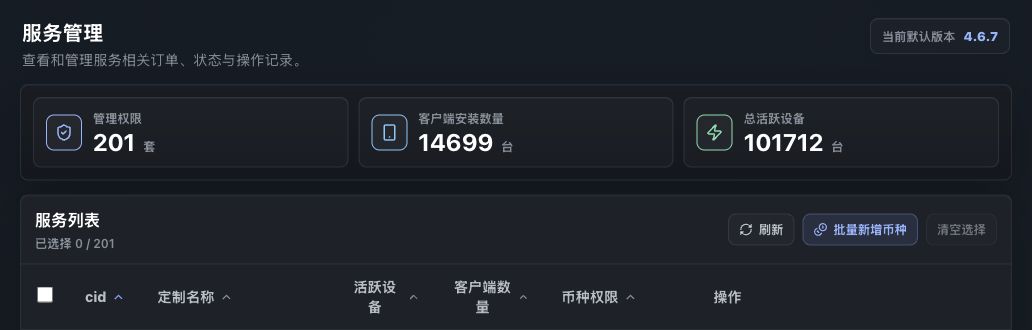
Service Management lists custom services by CID and provides entry points for coin permissions, wallet configuration, historical versions, and client details.
Service Management is the main operations page. Each row represents one installed RustMinerSystem custom service, including CID, custom name, active devices, client count, coin permissions, and action buttons.
Summary
| Metric | Description |
|---|---|
| Management scopes | Number of custom services visible to the current account. |
| Client installs | Total installed clients in the visible scope. |
| Active devices | Total active devices in the visible scope. |
| Default version | The latest version used by default for new configuration. |
Use this page for per-service configuration. Use the dashboard for broader business observation.
Service List
| Field | Description |
|---|---|
| cid | Unique management ID for the custom service. |
| Custom name | Human-readable customer or brand name. |
| Active devices | Active devices under this service. |
| Client count | Installed clients under this service. |
| Coin permissions | Enabled coins / total available coins. |
| Actions | Wallet config, coin permissions, historical versions, and client details. |
The list can be sorted by CID, custom name, active devices, client count, and coin permissions. After selecting multiple services, use Batch add coins to enable one coin for all selected services.
Coin Permissions
Coin permissions controls which coins a custom service can use. Search coins, select or deselect them, then submit the change for the default version.
Notes:
- The default effect is latest and future versions.
- To affect older clients, use
Apply to Historical Versionsafter the configuration is ready. - Batch add coins only adds the selected coin. It does not replace existing permissions.
Wallet Fee Configuration
Edit Fee Rate opens the wallet configuration drawer. The left side lists enabled coins, and the right side shows active wallets and pending requests for the selected coin.
Wallet fields include anonymous wallet, subaccount, fee ratio, device name, follow/specified pool mode, TCP/SSL protocol, pool address, and version.
Adding, editing, or deleting a wallet creates an audit request. Until the request is approved, the change appears under pending requests and does not replace the active production configuration.
Historical Versions
New configuration normally targets the latest and future versions. If a customer still runs an older version:
- Finish the coin or wallet configuration for the latest version.
- Wait for any required audit to be approved.
- Confirm the customer version.
- Use
Apply to Historical Versions. - Recheck client details or dashboard metrics.
Client Details
View All Clients opens the per-service client list. Select a coin to view client CID, UUID, version, created time, and live hashrate.
Use it when a customer reports one machine missing, one version looks abnormal, or the service-level hashrate does not match the dashboard.
Operational Advice
- Be careful when changing fee ratios.
- Avoid Chinese characters and unsupported special characters in device names.
- Before batch-enabling a coin, confirm every selected CID needs it.
- Some protected CIDs can be read-only for wallet configuration.