
Documentation
Pool Nodes and Inside Fees
Use the Pool Nodes page to view BTC, FB, LTC, DOGE, and BELLS live node data, and manage inside and official fee rates.
Pool Nodes and Inside Fees
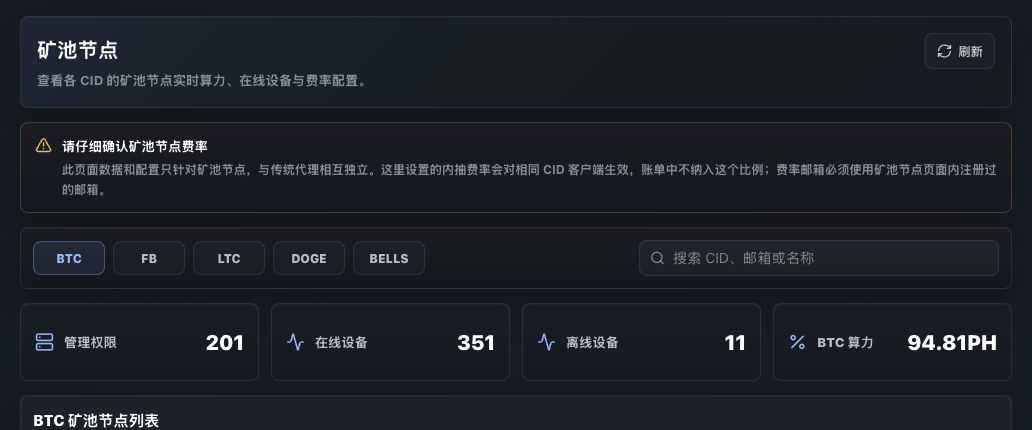
Pool Nodes shows live node data by coin and lets operators maintain PoolNode-specific fee settings.
The Pool Nodes page is for PoolNode scenarios. It is independent from traditional RustMinerSystem proxy wallet configuration. Inside fee settings on this page apply to pool-node clients with the same CID.
Supported Coins
| Tab | Config coin |
|---|---|
| BTC | PI-BTC |
| FB | PI-FB |
| LTC | VA-LTC |
| DOGE | VA-DOGE |
| BELLS | VA-BELLS |
Switching a tab reloads the node list, online devices, offline devices, and total hashrate for that coin.
Summary Cards
| Metric | Description |
|---|---|
| Management scopes | Visible CIDs for the selected coin. |
| Online devices | Total online devices for the selected coin. |
| Offline devices | Total offline devices for the selected coin. |
| Hashrate | Total live node hashrate for the selected coin. |
The search box filters by CID, email, or custom name.
Node List
The list includes CID, custom name, live hashrate, online/offline devices, fee email, official fee, inside fee, and actions.
The fee email must be registered in the RUST pool-node page. Do not substitute a pool-website email.
Inside Fee
Click Inside Fee on a row to set the inside fee for that CID and coin.
Requirements:
- Use an email already registered in the RUST pool-node page.
- Enter a percentage from
0to5. - Inside fee is not included in the official bill ratio.
Official Fee
Accounts with the required permission can set Official Fee. Other accounts usually only see inside-fee actions or read-only node data.
Before changing an official fee, confirm the target CID, coin, fee email, and business or finance agreement.
Difference From Service Management
| Page | Manages |
|---|---|
| Service Management | Coin permissions, wallet fee configuration, historical versions, and client details. |
| Pool Nodes | Pool-node live data, online/offline devices, inside fees, and official fees. |
For traditional proxy fee settings, check Service Management first. For PoolNode customers, check this page first.
Operational Advice
- Confirm the selected coin tab before saving a fee.
- Search by CID or email before operating on long lists.
- Do not confuse inside fee with official fee.
- Refresh after saving and confirm the ratio updated in the list.