
Documentation
RustMinerSystem Proxy Port Creation and Editing
Create, edit, and clone RustMinerSystem proxy ports with protocol, pool, traditional efficient or lossless fee mode, wallets, and advanced settings.
Proxy Port Creation and Editing
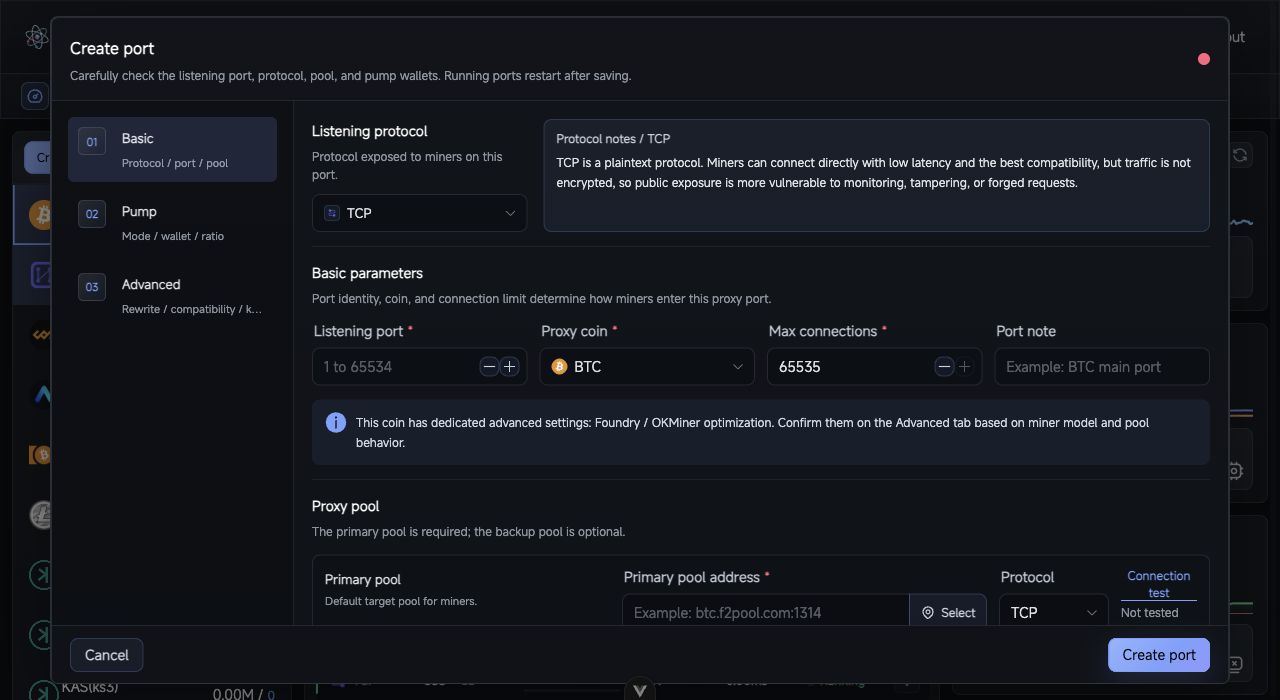
Proxy port form: configure the listener protocol, upstream pool, fee wallets, and advanced options across the Basic, Fee, and Advanced steps.
Proxy ports are the core RustMinerSystem workflow. Miners connect to a RustMinerSystem listening port, then the server forwards traffic to the configured upstream pool, records statistics, and applies fee wallets and compatibility rules.
Create a Port
- Open
Mining Proxy. - Click
Create New Proxyin the coin list. - Complete the
Basic,Fee, andAdvancedsections. - Click
Create Port.
Basic Settings
| Field | Description |
|---|---|
| Listening protocol | Protocol miners use to connect to RustMinerSystem. |
| Listening port | Must be 1 to 65534; avoid conflicts with web or mining ports. |
| Coin | Controls parsing, statistics, icon, and some compatibility settings. |
| Max connections | 0 means unlimited; production deployments should set a realistic limit. |
| Remark | Human-readable name such as BTC main port. |
| Primary pool | Default upstream pool. |
| Backup pool | Optional fallback pool. |
| Pool protocol | Must match the upstream address: TCP for TCP endpoints, TLS/SSL for SSL endpoints. |
Use the connection test buttons before saving when possible.
Listening Protocols
| Protocol | Use case |
|---|---|
| TCP | Best compatibility, commonly used on trusted networks. |
| TLS/SSL | Encrypted miner connection using the global mining certificate. |
| TTS | One port accepts both TCP and TLS miners. |
| TP | Transparent forwarding only; no parsing, statistics, fee, or replacement features. |
| RMS2 | RMS local client compressed TLS protocol. |
| RMS3 | Group compression protocol with high compression and higher CPU usage. |
| RMS3(Zstd) | Zstd-based RMS3 variant, usually lighter on CPU. |
| KENC | Compatible with KT local tools or KENC clients; key must match settings. |
Fee Wallets
Each fee wallet can contain wallet or subaccount, worker name, fee percentage, fee pool, and fee pool protocol. Keep the number of fee wallets small. If multiple parties need revenue sharing, pool-side split rules are usually easier to operate.
Connection and efficient-mode types
Choose Efficient for normal operation or Compatible only when particular miners cannot collect fees reliably. Efficient mode then offers two types:
Traditional Efficientworks with most coins and pools and allows an independent fee pool.Lossless Pumpingcurrently supports BTC and LTC and avoids customer hashrate loss caused by task switching or difficulty changes.
When you select Lossless Pumping, the dialog shows the current primary-pool address and loads the supported pool list. Select the platform that actually owns that address. Only pools in the list support this mode; if your target pool is absent, use Traditional Efficient.
Lossless Pumping requires fee work and customer mining to stay on the same pool platform. Every fee wallet’s pool address and protocol are locked to the primary pool. The fee wallet address, worker name, and ratio remain independent and do not have to match the customer’s wallet.
Select the actual primary-pool platform carefully. A platform that does not match the primary-pool address can cause fee failures and serious, unpredictable results. Select the lossless pool again after changing the coin; use Traditional Efficient for coins other than BTC or LTC.
Advanced Settings
Advanced settings affect submitted data, compatibility, or share responses. Leave them at defaults unless the scenario is clear.
| Setting | Guidance |
|---|---|
| RMS3 compression level | Higher values usually save more traffic but increase CPU load. |
| RMS3 super compression | Must match the RMS local client setting. |
| Foundry / OKMiner optimization | Use for BTC, BCH, or LTC miners with those connection issues. |
| Lucky Miner optimization | Use for specific LTC firmware issues. |
| Hashrate protection | Protects customer hashrate but may under-collect fees. |
| Force successful share response | Treat with care; it changes what miners see after failed submissions. |
| Kernel info replacement | Rewrites submitted miner kernel information. |
Wallet / worker-name hot replacement
After creating the port, open Wallet / worker name hot replacement from the port list or port-detail actions. The current rule format combines both identity parts as wallet.device; wallet and worker-name rules are no longer created as separate types.
- Each side of the match can be one value, a comma-separated list, or a whole-side
*. a.*matches every worker using walleta;*.bmatches worker namebunder any wallet;*.*matches every miner on the port.a,b,c.*matches several wallets, while*.d,e,fmatches several worker names.- Use
#{WALLET}on the target wallet side to preserve the current wallet and#{DEVICE}on the target worker side to preserve the current worker name. - Target
a.#{DEVICE}changes only the wallet,#{WALLET}.bchanges only the worker name, andc.dchanges both.
Rules can be added, previewed, and deleted, but not edited in place. A match forcibly disconnects the affected miner and applies the new identity on its next connection. Use *.* carefully to avoid reconnecting a large group at once. See Wallet and worker-name hot replacement for the full workflow and Proxy ports and fee-wallet API for the request contract.
Edit or Clone
Edit Portloads the full configuration. Running ports restart after saving.Clone Portuses the current port as a template.Hot Update Fee Configchanges fee wallets, worker names, ratios, and editable fee-pool fields without disconnecting miners. In lossless mode, the fee pool and protocol stay locked to the primary pool.Wallet / worker name hot replacementadds, previews, or deletes combined identity rules for the current port.
After creating or editing a port, test with a few miners first, compare RustMinerSystem data with upstream pool data, then scale gradually.