
Documentation
Custom iOS Widget
Paid custom editions of RustMinerSystem can use a Scriptable-based iOS widget to show online devices, pending reviews, client count, coin device totals, hashrate, and trends on the iPhone home screen.
Custom iOS Widget
Paid custom editions of RustMinerSystem can use a Scriptable-based iOS widget. It is a home-screen companion for paid custom editions, giving customers a quick view of their own custom-edition summary statistics.
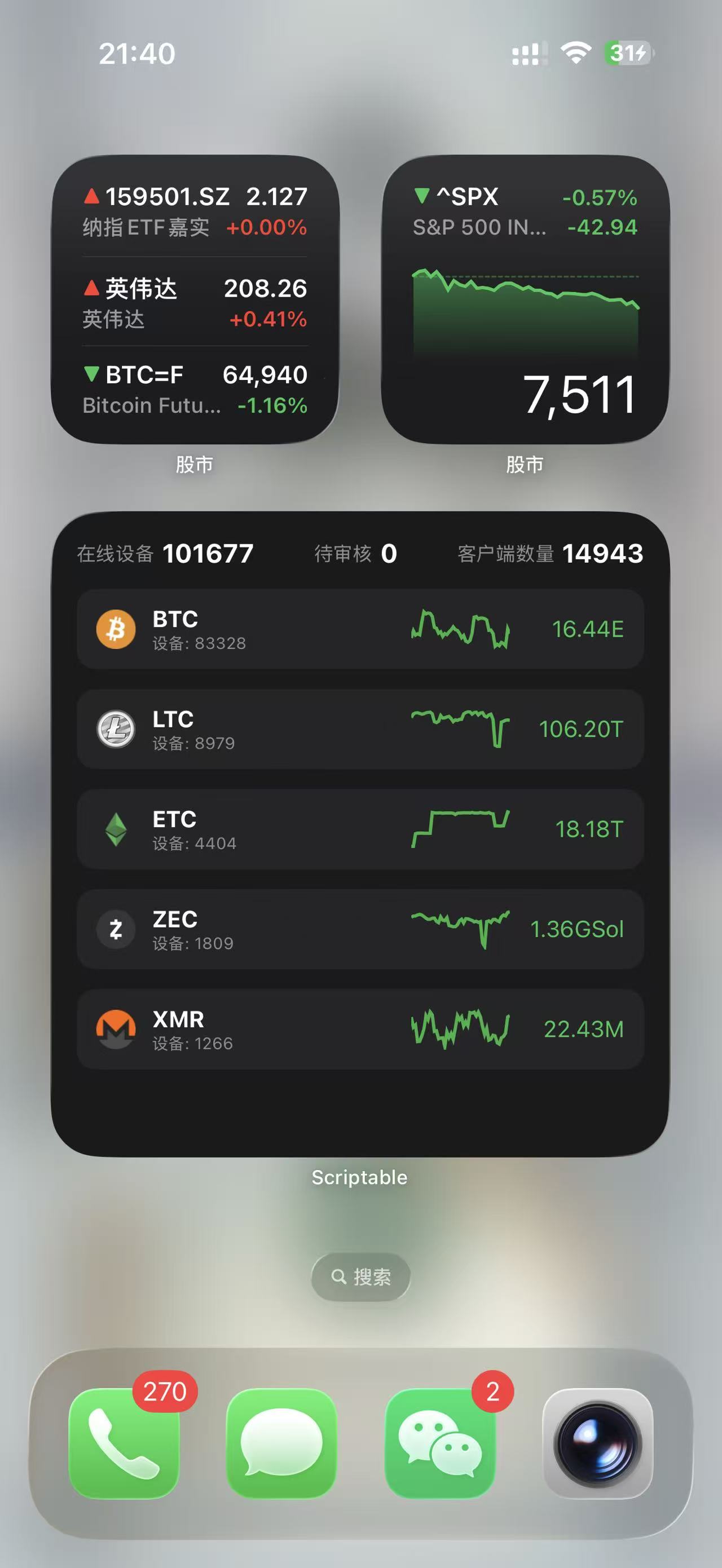
The widget shows online devices, pending reviews, client count, coin device totals, hashrate, and trends on the iPhone home screen.
Who Uses It
| Role | Description |
|---|---|
| Custom service operator | Manually generates the CTL Token and uses the download page to create a Scriptable script with the token inserted. |
| Custom-edition customer | Installs Scriptable on the iPhone, imports the script, and adds the widget to the home screen. |
| Management backend | Provides the custom management API used by the widget to read statistics. |
What It Shows
The widget is designed for quick checks and does not replace the full Custom Management console. It compresses the most useful customer-facing data into an iOS widget layout:
| Data | Description |
|---|---|
| Online devices | Current online or active devices for the custom edition. |
| Pending reviews | Wallet or configuration review requests still waiting for action. |
| Client count | Installed clients for the custom edition. |
| Coin list | Main coins sorted by device count, such as BTC, LTC, ETC, ZEC, and XMR. |
| Hashrate and trends | A compact hashrate value and short trend line for each coin. |
Generate the Script
- Manually generate the CTL Token for the customer and confirm that it only grants access to that customer’s custom-edition statistics.
- Open the
Custom iOS Widgetpage underDownload. - Paste the CTL Token into the page and generate the download.
- The page writes the token into the
CTL_TOKENvariable locally in the browser and downloads a new JavaScript file.
The token is not submitted to a server and is not written into the website repository. It only exists in the generated script file.
Customer Setup
- Install Scriptable from the iPhone App Store.
- Send the generated JavaScript file to the iPhone.
- Import the script through the iOS share menu by choosing Scriptable. If the share menu is unavailable, create a new script in Scriptable and paste the file contents.
- Long-press the iPhone home screen, tap plus, and choose a large Scriptable widget.
- Edit the widget and select the imported script.
- Wait for the widget to refresh and confirm that it shows the customer’s own custom-edition data.
Security and Maintenance
- The CTL Token is the credential used by the widget to read statistics. Share it only with the matching customer.
- If the token leaks, generate a new token and ask the customer to download the script again.
- The iPhone must be able to reach the custom management API, otherwise the widget cannot refresh.
- If the customer changes phones, removes Scriptable, or reinstalls the script, they need to import the tokenized script again.
- The widget is for home-screen overview only. Configuration changes, audit handling, and permission changes should still be done in Custom Management.